Writing · Productivity
Teach AI to write in your voice
Writing a thoughtful letter can take me ages. I want the person receiving it to feel the time, love, effort and thought I put in. I’ve never been a strong writer, so I welcome any help finding the right words.
Give your AI examples of writing you’re proud of, such as letters or emails. It can learn what makes them sound like you and help you reach your own standard, saving you buckets of time.

YOU’LL NEED
- 3 examples of your writingIf you have more, add as many as you have
- A GitHub account
- Claude or Codex
STEP BY STEP
THE WORKFLOW
5 STEPS01Get your writing examples
1.1Choose what to speed up
I used thank-you letters. You can use whatever you write often and would appreciate writing faster: CEO updates, Christmas cards, life updates, or something else.
1.2Gather your examples
Choose finished examples that sound like you at your best. Three is enough to start, even if they cover different occasions. Have more? Add plenty. Your AI will group them by writing type.
02Save your examples
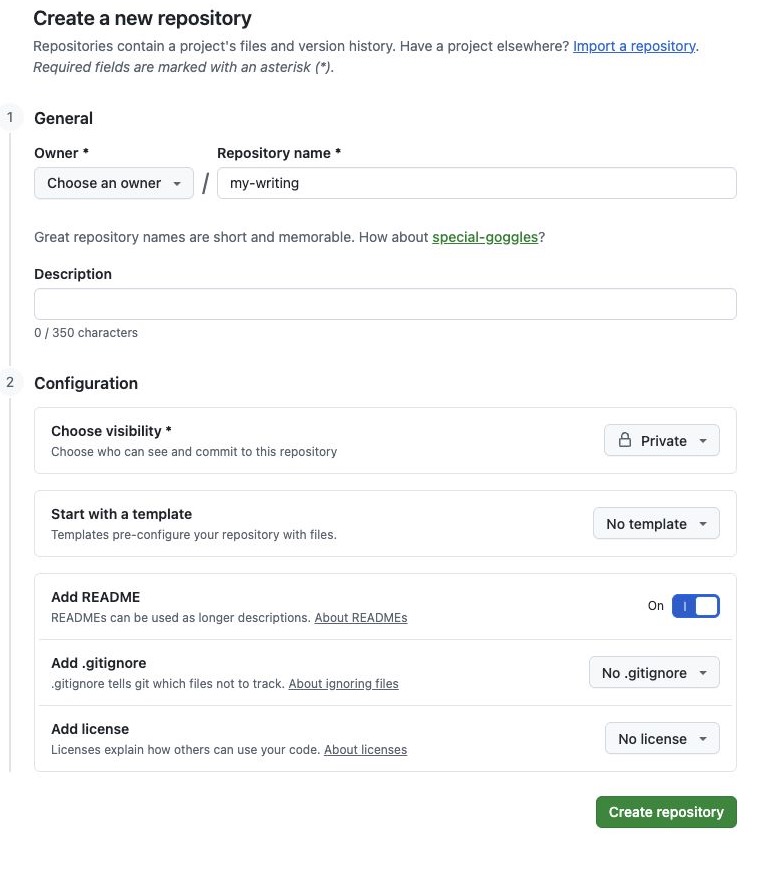
2.1Create a private repo
Open GitHub’s new repository page. Use these settings:
- Owner: Choose your account
- Repository name:
my-writing - Choose visibility: Private
- Add README: On
Select Create repository. Keep the new page open; you’ll need its URL in Step 2.2.
2.2Open it with your AI
Copy this prompt into a new Claude or Codex chat. Leave it unsent.
Help me open my private GitHub repository as a project: [REPOSITORY URL]. If I need to sign in or choose a folder, guide me through it. Tell me when the project is ready.
- Return to your new GitHub repository page and copy its URL from the browser’s address bar
- In your AI chat, select the
[REPOSITORY URL]placeholder in the unsent prompt and paste the URL over it - Hit send and follow any sign-in steps your AI gives you
2.3Paste this prompt
I’ll paste examples of my finished writing, one at a time. Save each exactly as written in its own file inside examples/. Sort them into folders by writing type, such as examples/life-updates/ or examples/christmas-cards/. I may share several types and more than three examples. If you cannot tell which type an example belongs to, ask me. After each one, show me the saved text and filename so I can check them, then ask for the next.
2.4Share your examples
Share your finished examples one at a time when your AI asks for them.
- Best practice:
- Remove people’s names and any details you’d like to keep private before sharing your examples
- Keep the repository private
I had lots of examples saved in my Notion, so I asked my AI to grab them directly from there.
03Teach AI what sounds like you
3.1Make your style file
When you have shared your examples, paste this prompt into the same project:
Read all my writing examples in examples/. Create writing-style.md. First, describe the habits that show up across my writing. Then add a short section for each writing type, using its own examples. Look at openings, level of detail, humour, sentence rhythm and endings. Base the rules on my examples, not generic advice. If a type has only one or two examples, mark its rules as tentative. Do not turn people’s names or one-off memories into rules. Show me the writing types you found and the style file so I can correct them.
3.2Correct the style file
- Read the writing types and
writing-style.mdyour AI shows in the chat - Tell your AI about any wrong or missing writing types
- List any style rules to remove or add
- Ask your AI to show you the corrected file
- When it looks right, ask your AI to save the examples and style file to your private GitHub repository
04Ask for your first draft
4.1Give it real details
Replace each placeholder with your own writing type, reader and facts. For example, [WRITING TYPE] might be “CEO update” or “Christmas card.”
Use writing-style.md and the examples for [WRITING TYPE] to draft a [WRITING TYPE] for [WHO WILL READ IT]. Include these real details: [DETAILS]. Ask me about anything important that is missing before you write. If I have no examples for this writing type, ask me for some first. Do not invent facts. Give me a draft to edit; do not send it.
4.2Make it sound like you
- Read the draft
- Tell your AI what feels off, even if it’s a list of changes
- Ask it to revise the draft
- Ask it to add any useful lessons about your voice to
writing-style.md - Ask it to save the updated style file to GitHub
05Next time
5.1Open my-writing
- Open your
my-writingproject in Claude or Codex - Copy and paste the prompt below into your AI chat
Help me draft a [WRITING TYPE] in my voice. Use writing-style.md and my examples for this type. Ask me who will read it and which real details to include before writing. Do not invent facts. Give me a draft to edit; do not send it.
- Replace the
[WRITING TYPE]placeholder with what you want to write, then send it